Base44 App Limitations: When to Bring In a Real Developer
Base44 App Limitations: When to Bring In a Real Developer
Base44 might be the easiest way there is to turn an idea into a working app. You type what you want in plain English. It builds the screens, the sign-in, the database, and even payments. No setup, no code, no confusion.
That ease is exactly why so many non-technical founders choose it. And it is also why so many of them hit a wall later — often at the worst possible moment, when the app is finally getting real users.
We repair and migrate AI-built apps for founders every week. Base44 projects have their own pattern of problems, different from Lovable or Bolt. Here are the real Base44 app limitations, the warning signs, and what a developer can actually do about them.
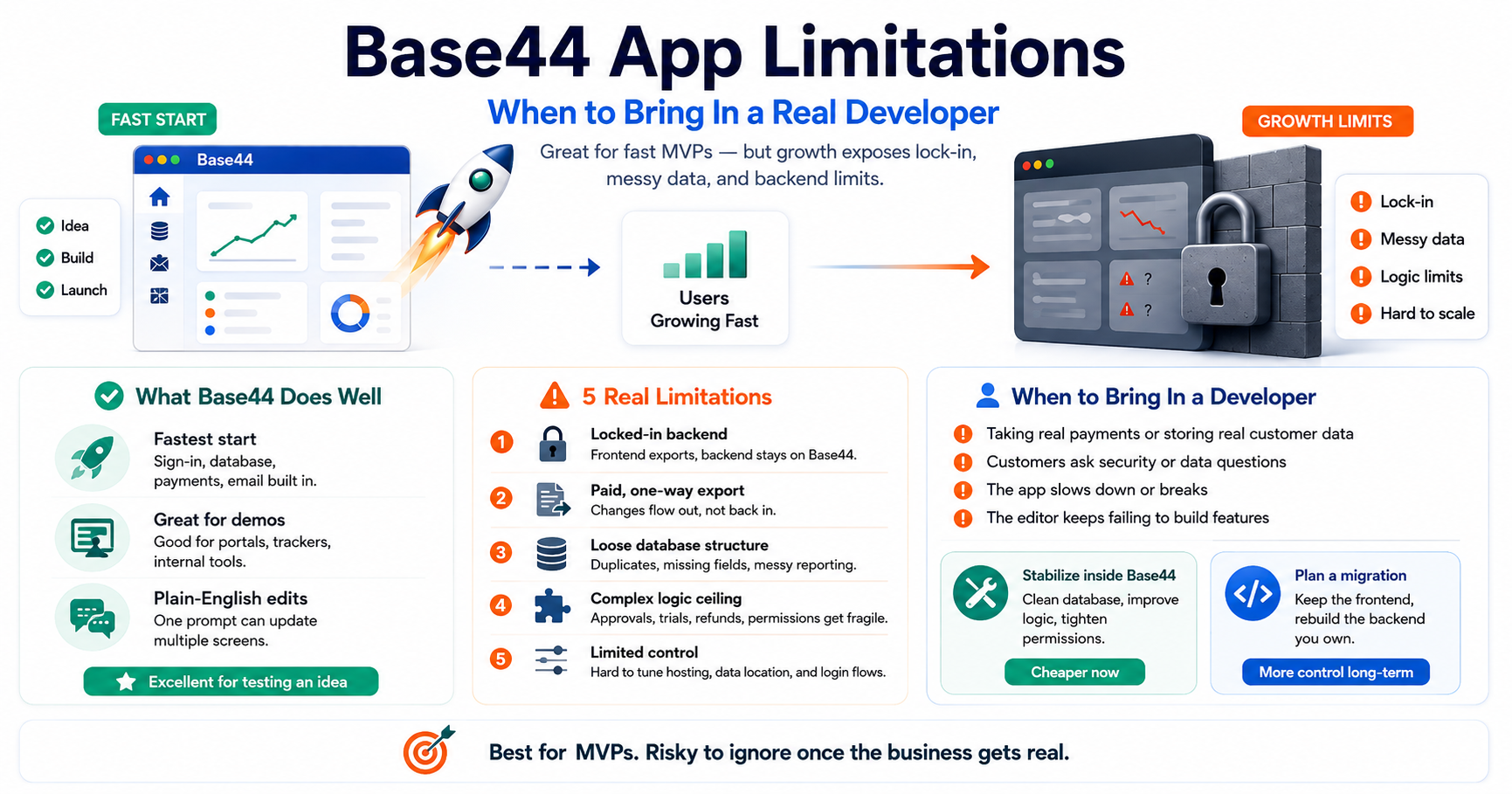
What Base44 Does Well
- The fastest start. Sign-in, database, payments, and email come built in. No third-party setup at all.
- Great for demos and simple tools. Directories, trackers, internal tools, and client portals come out clean and fast.
- Plain-English edits. One sentence can update several screens at once, and earlier logic usually holds up.
For testing an idea, Base44 is honestly hard to beat. The limitations appear when the idea works — and you need the app to grow up.
The 5 Real Limitations of Base44 Apps
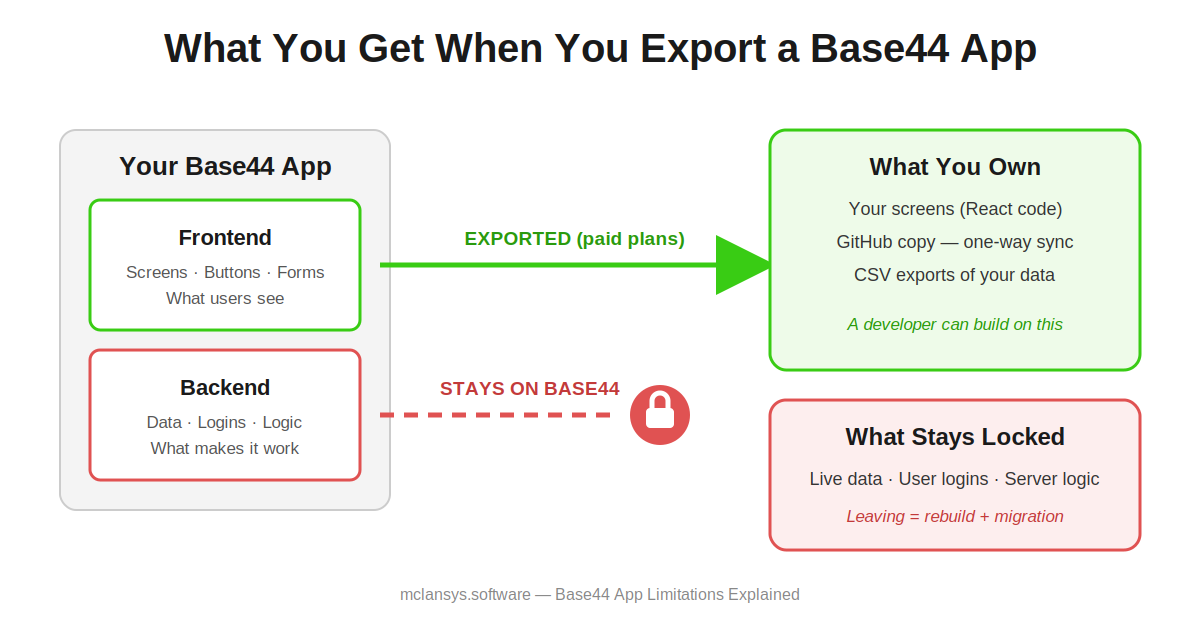
- The backend is locked in. This is the big one. When you export your code, you get the frontend — the screens. The backend — your data, logins, and business logic — stays on Base44’s platform. Your app cannot simply be picked up and moved somewhere else.
- Export is a paid feature, and it is one-way. Code export needs a paid plan. And changes flow from Base44 to GitHub only. Work a developer does locally cannot flow back into the Base44 editor.
- The database is loose by design. Base44 lets you add data without much structure. That is great for speed. But when a real business depends on that data, the mess shows up as duplicates, missing fields, and reports that do not add up.
- Complex logic hits a ceiling. Multi-step rules — approvals, subscriptions with trials, refunds, role-based permissions — are where the plain-English approach starts producing fragile results.
- You cannot tune what you cannot touch. Database speed, custom login flows, and hosting choices sit inside Base44’s platform. When the app slows down or a customer asks where their data lives, there is a limit to what anyone can change.
4 Signs It Is Time to Bring In a Developer
- Your app is about to take real payments or store real customer data.
- A business customer asks security or data questions you cannot answer.
- The app slows down or misbehaves, and prompting Base44 no longer fixes it.
- You need a feature the plain-English editor keeps failing to build.
What a Developer Can Actually Do With a Base44 App
Here is where honesty matters. With Lovable or Bolt, a developer usually repairs the app in place, because you own all the code. With Base44, the backend lock-in changes the job. A developer typically offers you a choice:
- Stabilize inside Base44. Clean the database, tighten permissions, restructure the logic, and set up proper backups. Best when the app is small and Base44 still fits your needs. This is the cheaper path.
- Plan a migration. Keep your exported frontend, rebuild the backend on a platform you own, and move your data across carefully. Best when you are scaling, selling to businesses, or want full control. It costs more — but you only pay it once, and you own everything after.
The right choice depends on the app’s size and where the business is going. A short code and data review answers it quickly — usually within a week. For how to choose and vet the developer who does this, our guide applies fully here: How to Hire Developers to Fix Your AI-Generated App.
Common Questions About Base44 Apps
Can I export my code from Base44?
Partly. On paid plans you can export the frontend to GitHub or as a ZIP. The backend — your data, logins, and server logic — stays on Base44’s platform.
Can I move my Base44 app to my own hosting?
Not directly. Moving off Base44 means keeping the exported screens and rebuilding the backend on a platform you own, then migrating your data. A developer can scope this in a short review.
Is Base44 good enough for a real business?
For simple tools and early versions, yes. If you handle payments, sensitive data, or business customers, plan for either a professional clean-up inside Base44 or a migration to your own stack.
Should I leave Base44 or stay?
Stay if the app is small and Base44 still covers your needs — a clean-up is cheaper. Migrate if you are scaling or need control over data and hosting. Decide with a code review, not a guess.
The Bottom Line
Base44’s limitations are the price of its ease. It removed every technical decision so you could ship fast — and it kept those decisions for itself. That is a fair trade for a first version. But when your app starts to matter, get clear on your exit path before you need it. The founders who struggle are the ones who discover the lock-in during a crisis, not before it.
Built something on Base44 and wondering what your options are? McLanSys has stabilized and migrated dozens of AI-built apps for founders across the USA, Canada, Singapore, and Australia. Start with our free code review — and if you move forward, your first 100 development hours are on us.
↓ Fill Out the Form Below to Get Your Free Code Review