Elevate Your Startup: Affordable Android App Development Services
Liam Hayes – Startup Founder – In today’s competitive market, android app development services can make a significant difference for your business.
April 3, 2025 | 9 Minute Read
Android App Development Basics
Let’s chat about what goes into whipping up a solid Android app. Following some key guidelines ensures that what your app offers isn’t just a hit but also plays nice with users. We’re diving into the nitty-gritty of Material Design and making your app’s screen look spiffy on all devices.
Material Design Guidelines
Ever wonder what makes Google apps look so snazzy? It’s called Material Design, and it’s more than just eye candy—it’s a blueprint for creating intuitive and engaging interfaces. Dive into the juicy details to make your app stand out:
Material Elements: Think of these as your building blocks—like a comfy chair in a room, elements like buttons and cards should feel right at home. Tables, lists, and buttons? They make folks feel cozy and right where they belong.
Bold and Graphic Intentional: Leverage big, bright colors and striking typography that says, “Look at me!” A splash of bold makes sure nobody misses out on what you’re trying to say.
Meaningful Motion: A little movement goes a long way. Sprinkle in animations, so users know what’s happening and enjoy the ride.
| Principle | Description |
|---|---|
| Material Elements | Use elements that feel familiar and comfortable |
| Bold Graphic Intentional | Bright colors and big visuals for impact |
| Meaningful Motion | Animations that tell a story |
Want to dive deeper into mobile magic? Peek at our mobile app design and development services.
Responsive Screen Designs
When it comes to Android apps, we’re talking a universe of gadgets with screens from pocket-sized to whopping great big. So, how do you craft apps that look awesome everywhere? Here’s the scoop on making that happen:
Flexible Layouts: Forget one-size-fits-all. Use layouts that adjust to whatever screen they’re on, whether it’s flipping from portrait to landscape or aiming for a high or low resolution.
Resource Variations: Plan ahead with your images and layouts. This way, whether your app pops up on a pint-sized watch or a massive TV, it’s ready for its close-up.
UI Testing Across Devices: Don’t just make it and leave it. See how your app performs across all the gadgetry out there—phones, tablets, smartwatches, you name it.
| Device Type | Key Considerations |
|---|---|
| Smartphones | Keep it tight and tidy for smaller screens |
| Tablets | Think multi-view and more room to show off your data |
| Smartwatches | Simple enough to glance at while you’re sipping coffee |
| TVs | Go large, clear, and easy from way back on the couch |
Getting your app to play nice with different screens is mission-critical, and if you need a hand, our custom app development services can help you get there.
By putting these ideas to work, your apps are gonna not only look sharp but run like a dream, no matter the device. Want to offer your users a top-notch experience? Check out our tailored custom mobile app development services and web app development services.
Importance of Keeping It Together
Getting your Android app to look and feel smooth as butter isn’t just wishful thinking; it’s the magic that keeps users coming back for more. When everything clicks into place seamlessly, users are chuffed, and the app gets some serious brownie points.
Matching Socks: UI Style
Matching socks might not be everyone’s forte, but when it comes to Android app design, nobody likes a mix-and-match disaster. Keeping things consistent—colors, fonts, button shapes, you name it—helps users glide through your app without getting knotted up.
Sticking to Google’s Material Design playbook is a smart move. It keeps things looking Mr. Sheen-level polished and gives a nod to what users expect. When icons, gestures, and menus don’t pull a Houdini on people, they gel with your app like bread and butter.
| Element | Keeping It Steady | What It Does |
|---|---|---|
| Colors | Pick n’ Stick Palette | Keeps the brand on point. |
| Fonts | Same Ol’ Letters | The same size and style for that neat look. |
| Buttons | Familiar Shapes & Sizes | Everything looks like it belongs on the same car. |
| Spaces | Mind the Gaps | It’s neat freak heaven with tidy spacing. |
Making It Work: User Vibes
Appealing to user vibes? It’s not just about how the app looks, but how it vibes with them. It’s like giving users the keys to a new car and having the seat adjustments memorized—all comfy and frictionless.
Swiping isn’t just for Tinder. It’s a lifesaver with intuitive gestures for those who might struggle with other interactions. Keeping the fancy finger swirls steady across your app keeps users happy and in the driver’s seat.
And oh, Android apps, they’re like chameleons—able to adapt to big screens, small screens, and everything in between. Whether it’s on a snazzy new tablet or a grandma-friendly smartphone, making sure the app runs smoothly across the board is mission critical.
More on making things user-friendly? Check out our custom app development tips.
Focusing on consistent design and polished interactions isn’t just a checklist item. It’s how startups set their Android apps apart and fill users with joy. For apps that look great, work well, and you guessed it—bring some value home, check out our expert app development services.
Navigation Best Practices
Creating smooth sailing through an app is a must, particularly for startups eyeing affordable Android app development services. Let’s check out some popular ways to get users from A to B and keep accessibility firmly in the spotlight.
Standard Navigation Patterns
Good navigation is like a map for your app, showing users the way. Here are a few of the tried-and-true methods:
- Navigation Drawer: Imagine a magic curtain that reveals menu options with a simple swipe from the left of your screen. It’s a tidy way to handle lots of app sections.
- Bottom Navigation: This is your quick-switch buddy at the screen’s footer, home to a bunch of icons and labels. Perfect for apps with just a handful of main areas.
- Navigation Tabs: Tabs are there for the swiping aficionados, letting you hop between content-rich sections like a champ.
Want the nitty-gritty on designing and developing? Dive into our mobile app design and development services.
Accessibility Support
Opening up your app to everyone—including folks with disabilities—is not just nice; it’s necessary. Here are a few tips to make your app easier for everyone to use:
- Tweak Those UI Elements: Give text some breathing room with padding, or switch up those background hues with a Surface container for more comfy reading.
- Talk to the Screen Readers: Give all buttons and interactive bits a voice, so screen readers can speak up for visually impaired users.
- Gesture-Friendly Moves: Add in swipe or other touch gestures to make life easier for those with mobility issues. It’s all about intuitive motions.
Think broad and think cross-platform. Our hybrid app development services are up to the task when it comes to accessibility.
By getting the hang of top navigation styles and ensuring accessibility, startups can make their Android apps a joy for everyone to use. Keen for more on tailored app creation? Swing by our custom app development services to get the full scoop.
Programming Languages for Android
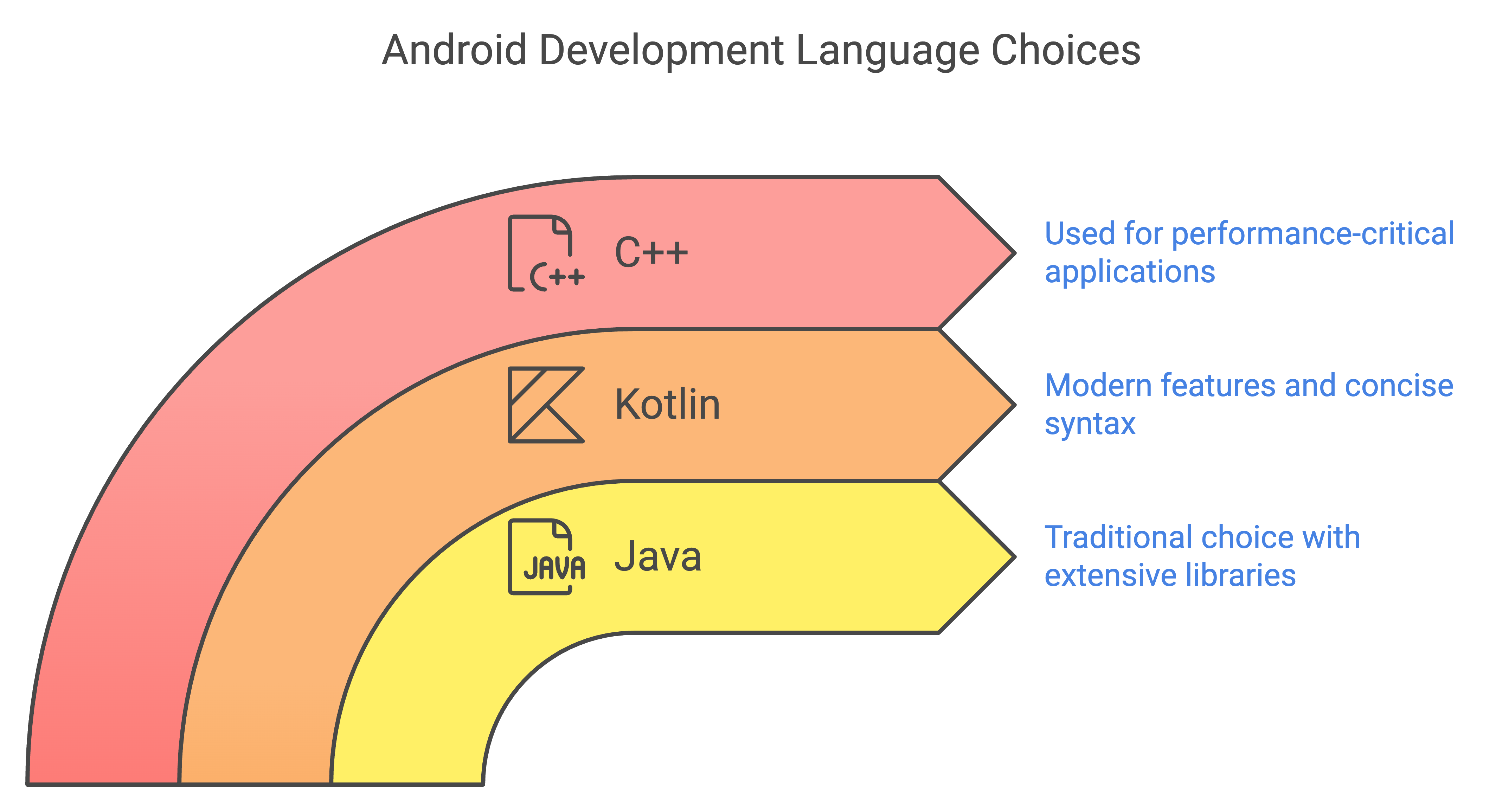
Picking the right language for your mobile app is like choosing the best gear for a fishing trip – vital for reeling in success! Each language and framework is like a different type of bait, attracting its own kind of fish in the mobile app design and development services pond.
Kotlin: Google’s Go-To Language
Kotlin isn’t just another pretty face in the coding lineup—it’s Google’s favorite for Android app gigs. Since the big thumbs-up from Google in 2017, Kotlin’s been on a roll with some killer features:
- Safety First: Goodbye to the usual bugs and glitches. With Kotlin, apps behave thanks to a built-in bug repellent.
- Get Along Gang: Plays nice with Java, so developers don’t have to toss out all that old, reliable code.
- Short and Sweet: Less clutter means more clarity, like reading a short story instead of a long-winded essay.
Because of all this goodness, mobile app development services can’t get enough of Kotlin for Android adventures.
React Native vs. Flutter vs. Java
Decision-making in the tech world feels like picking the right tool for a job. So let’s break down React Native, Flutter, and Java, so picking your app’s foundation gets a whole lot easier.
| What It Does | React Native | Flutter | Java |
|---|---|---|---|
| Brain Behind It | Oracle | ||
| Language | JavaScript | Dart | Java |
| Works Anywhere | Yup | Yup | Nah |
| Zoom Zoom | Speedy | Lightning Fast | Cruising |
| Learning to Use | Challenge Level: Medium | Challenge Level: Medium | Challenge Level: Hard |
| Old Stuff Friendly | Not much room | Not much room | Tons of it |
React Native
Brought into the tech scene by Facebook, React Native helps you whip up mobile marvels with JavaScript that charm both iOS and Android users. Switching lanes between platforms saves time and dough, perfect for wallet-conscious startups wanting top-notch custom app development services.
Need more info? Check out react native app development services.
Flutter
Calling all dev daredevils! Google’s Flutter offers up a single codebase party using Dart, delivering high-speed, all-the-bells-and-whistles apps. Plus, its UI goodies deck out your app in style.
Get full scoop on flutter app development services.
Java
Old-school Java still rocks the Android scene, especially for those taking care of retro code archives—think all those trusty tools and libraries. If it ain’t broke, don’t fix it.
Final choices hinge on stuff like project needs, team chops, and the gadget you’re gunning for. To find that perfect match, maybe chat with a seasoned mobile app development company.
Knowing the ropes here means startup folks can confidently steer their Android apps to greatness.
Useful Resources: